
MSP revenue report
The MSP revenue report separates recurring revenue from one-time project revenue, for deals you’ve won and deals still open. A single blended total can hide whether your managed-services base is growing or a good month was one large hardware order. This report adds the two together only in the Total value (TCV) column.
Go to Reports and click MSP revenue under Revenue.
The report covers the opportunities your role can view, across all time.
What each number means
Section titled “What each number means”The report reads these fields from each opportunity:
- MRR: monthly recurring revenue on a recurring deal.
- ACV: annual contract value. If you don’t enter one, Gabriel sets it to MRR times 12.
- One-time fees: setup, project or hardware revenue billed once.
- Total value (TCV): the deal’s Value. On a recurring deal left blank, it’s MRR times the contract term plus one-time fees.
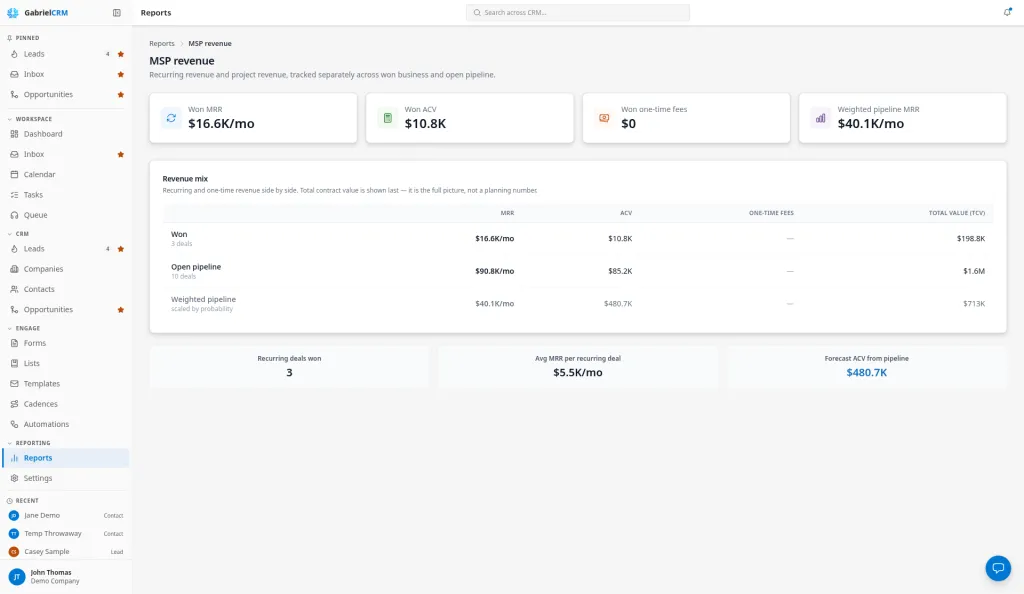
Headline numbers
Section titled “Headline numbers”| Number | What it counts |
|---|---|
| Won MRR | MRR of won deals, per month |
| Won ACV | ACV of won deals |
| Won one-time fees | One-time fees of won deals |
| Weighted pipeline MRR | MRR of open deals, each multiplied by its win probability |
Revenue mix
Section titled “Revenue mix”A table with MRR, ACV, One-time fees and Total value (TCV) for three rows:
- Won: deals in a stage with the Won outcome, with the deal count.
- Open pipeline: deals in a stage with the Open outcome, at full value.
- Weighted pipeline: the open deals, each scaled by its win probability. Its ACV is weighted MRR times 12.
Supporting figures
Section titled “Supporting figures”- Recurring deals won: won deals that have an MRR.
- Avg MRR per recurring deal: the average MRR across those deals.
- Forecast ACV from pipeline: weighted pipeline MRR times 12.
How it works
Section titled “How it works”- Won, lost and open come from each stage’s Outcome under Settings > Pipeline & Sales Stages, not from the stage name. Lost deals aren’t shown.
- A deal’s win probability is set from its stage when it moves into that stage. Changing a stage’s probability in settings doesn’t change deals already in it.
- Amounts are shown rounded, such as $12.5K.
Best practices
Section titled “Best practices”- Plan on weighted numbers, report on won numbers. Weighted pipeline MRR is a forecast; Won MRR is what you’ve booked. Keep the two apart in conversations with leadership.
- Enter MRR on every recurring deal. A recurring deal without MRR adds nothing to Won MRR or the forecast, and doesn’t count in Recurring deals won.
- Put setup and hardware in One-time fees, not MRR. Mixing a one-time charge into MRR overstates your recurring base for every month after.
- Set stage probabilities from real close rates. The weighted figures are only as good as the probabilities on your stages. Review them each quarter against what actually closed.
- Move lost deals to a Lost stage promptly. A dead deal left in an open stage keeps inflating Open pipeline and the weighted forecast.
Troubleshooting
Section titled “Troubleshooting”The report says there are no opportunities yet. No deal you can see is won or open. Check that deals exist and that your role can view them.
A won deal is missing. Its stage doesn’t have the Won outcome. Edit the pipeline and set the stage’s Outcome to Won.