
Lead funnel report
The Lead funnel report shows how leads move from New to Converted, which sources produce leads that convert, and how many deals the converted leads went on to win.
Go to Reports and click Lead funnel under Leads & conversion.
The report covers the leads your role can see: your own, your team’s, or everyone’s, depending on your role’s reach on Contacts. It covers all time, apart from Monthly Trends.
What each section shows
Section titled “What each section shows”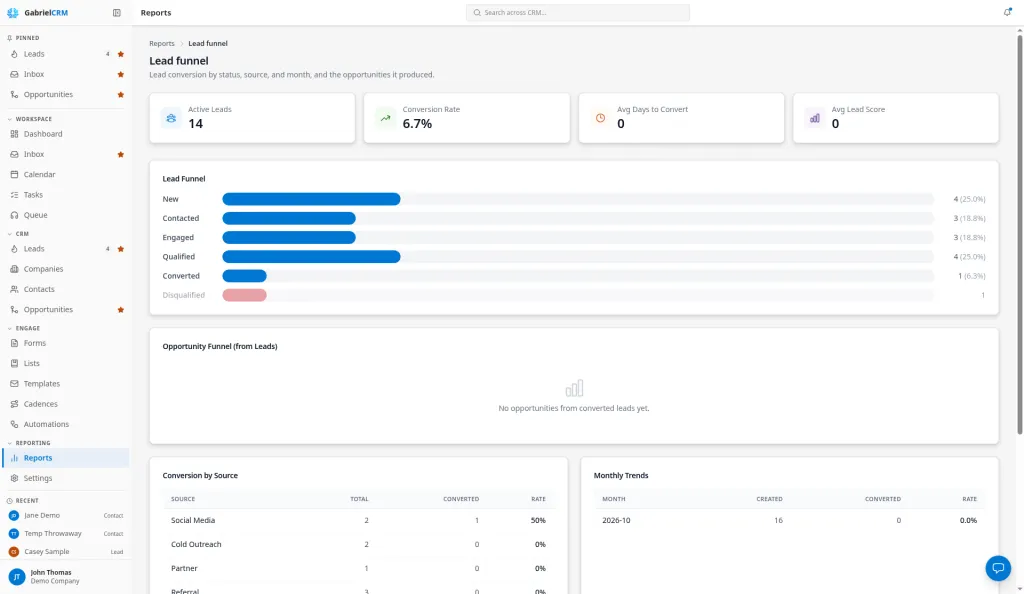
Headline numbers
Section titled “Headline numbers”| Number | What it counts |
|---|---|
| Active Leads | All leads except those Converted or Disqualified |
| Conversion Rate | Converted leads as a share of all leads, leaving disqualified leads out |
| Avg Days to Convert | Average days from a lead’s creation to its conversion, across converted leads |
| Avg Lead Score | Average score converted leads had when they converted |
Lead funnel
Section titled “Lead funnel”One bar per status, in order: New, Contacted, Engaged, Qualified, Converted. Each shows the count and its share of all leads. Disqualified appears below, faded, when you have any.
Stage movement
Section titled “Stage movement”How leads moved, rather than where they sit today. One row per stage:
- Leads reached: how many leads entered the stage at least once, even if they’ve moved on since.
- Avg days in stage: the average number of days a lead stayed before moving to another stage. Leads still in the stage don’t count until they leave, and Converted and Disqualified show a dash, because leads end there.
Gabriel started recording stage changes on the date shown above the table, so earlier moves aren’t counted. Until a lead in your view changes stage, the section says No stage changes recorded yet.
Opportunity funnel (from leads)
Section titled “Opportunity funnel (from leads)”The opportunities linked to contacts that came from converted leads:
- Total Opportunities, Won, Lost and Open
- Win Rate: won deals as a share of won plus lost. Open deals don’t count.
- Avg Won Value and Total Won Value
A deal counts as won or lost by its stage’s Outcome, not its stage name.
Conversion by source
Section titled “Conversion by source”One row per lead source with Total, Converted and Rate, highest rate first. Leads without a source and disqualified leads are left out.
Monthly trends
Section titled “Monthly trends”The last six months. For each month, Created is leads created that month and Converted is leads converted that month; Rate divides one by the other. A lead created in March and converted in April counts in both months.
Top converters
Section titled “Top converters”The ten people who converted the most leads, with Conversions and the average days those leads took (Avg Days).
How it works
Section titled “How it works”- Statuses are fixed: New, Contacted, Engaged, Qualified, Disqualified and Converted. They can’t be renamed. If your team talks in MQLs and SQLs, see how they line up with these stages.
- Gabriel moves leads to Contacted and Engaged on its own as reps email, call and meet them, so those bars show real outreach, not what reps remembered to update. See How a lead moves through its stages.
- Sources are grouped by the exact source name saved on each lead. If a source is renamed in Picklists, leads saved before the change keep the old name and show as a separate row.
- Win Rate and Total Won Value include every opportunity on a contact that came from a lead, including deals created later for that contact.
Best practices
Section titled “Best practices”- Make Conversion by Source your channel review. Run it monthly. A source with a high total and a low rate is costing reps time; a source with a high rate and a low total is worth more investment.
- Set a source on every lead. Leads without a source don’t appear in Conversion by Source, so a habit of leaving it blank hides your best channels. Forms can set the source for you.
- Keep source names stable. Add a new source rather than renaming one that’s in use, and deactivate old ones. Renaming splits the report in two.
- Disqualify, don’t leave leads idle. Disqualified leads are left out of the conversion rate, so marking dead leads Disqualified keeps Active Leads and Conversion Rate honest.
- Find where leads stall in Stage movement. A long Avg days in stage on Contacted means leads aren’t answering your outreach; a long one on Engaged means conversations aren’t turning into qualified opportunities. Fix the stage that’s slowest, not the whole funnel.
- Watch Avg Days to Convert after process changes. If you add a cadence or change how leads are routed, compare this number month to month to see whether leads move faster.
- Managers: use Top Converters to find who to learn from. Pair a rep with few conversions and long average days with one at the top of the list.